|
ChiliBurner 2.0.1
Program Specifications
|
|
| Version: |
2.0.1
|
| Size: |
8.51 MB |
| Publisher: |
MOVAVI |
| Date Added: |
Apr 5, 2006 |
| License [?]: |
Shareware (USD$29.95 to buy) |
| Operating System: |
Windows XP, Windows ME, Windows 98, Windows 2000 |
| Requirements: |
|
| Download Links: |
Download ChiliBurner
|
BumperSoft Editor's Review Status:
|
|
|
|
Publisher's Description of ChiliBurner
|
" Save, share and enjoy your home video and audio masterpieces on CD and DVD. "
- From MOVAVI
I like to share my home-made videos with my relatives and friends. In the days of tape recorders, it was never a problem. You would simply plug your camera or your video player into another VCR and start copying. No need to care about formats. Just use a proper cord and you're all set. But, the digital millennium has brought brand new quality standards and expectations of an even easier process of copying and distribution. Unfortunately, while the quality is above all expectations, the process of copying has became quite annoying!
My new CD/DVD burner supports 16(!) different disk formats. When I try to burn some movies, I feel as if I'm back at school. Conversion utilities ask me to select formats, codecs, compression levels and tons of other options, the purpose of which is beyond me. They want me to do
complex math calculations in order to guess optimal parameters for fitting my movies into a specific media.
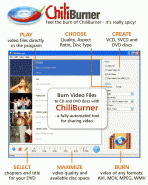
I need something completely automated. This is why I ended up with ChiliBurner from Movavi. This program allows you to copy your digital videos the way you copied your video tapes. You can select any target media. There are plenty of choices. You can burn a Video CD (VCD, a
common CD-ROM with low-res video that can be played even by a game console) or its higher resolution but shorter brother, the SVCD, Super
Video CD. Or you can make a modern DVD Video disk. It doesn't matter how many sides or layers your DVD media has. Just use what you have on hand.
Then select what you want to be burned on your disk. You can burn an uncompressed avi file captured from your camcorder or TV Tuner, or avi, mpeg, QuickTime and RealMedia files downloaded from the Internet or video streams from another DVD Video disk. When you select the files you want, you can see if there is enough space for them available on your media. You'll see a progress bar in real-time.
Then just burn it! It's as easy as copying a tape.
Limitations in downloadable version
Adding watermark to burned video.
|
Share ChiliBurner with Friends
Tags
|
RELATED DOWNLOADS
(DVD Burners and Copiers)
|
Sorry, no recommended downloads for this category.
|
|
|
|
WEEK'S TOP DOWNLOADS
(All Categories)
|
|